

Indicators

X Limitless - Commitments of Traders (COT)

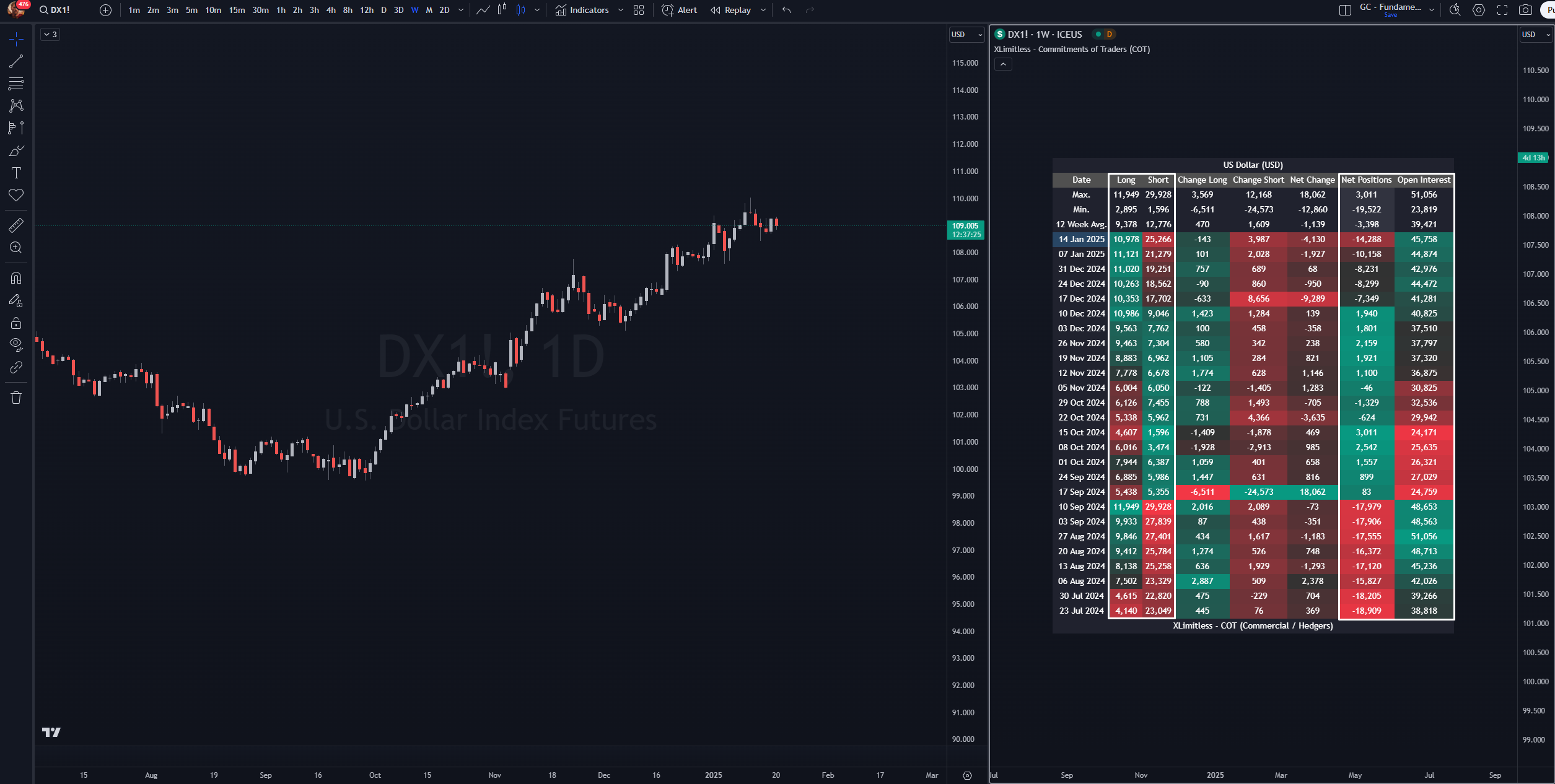
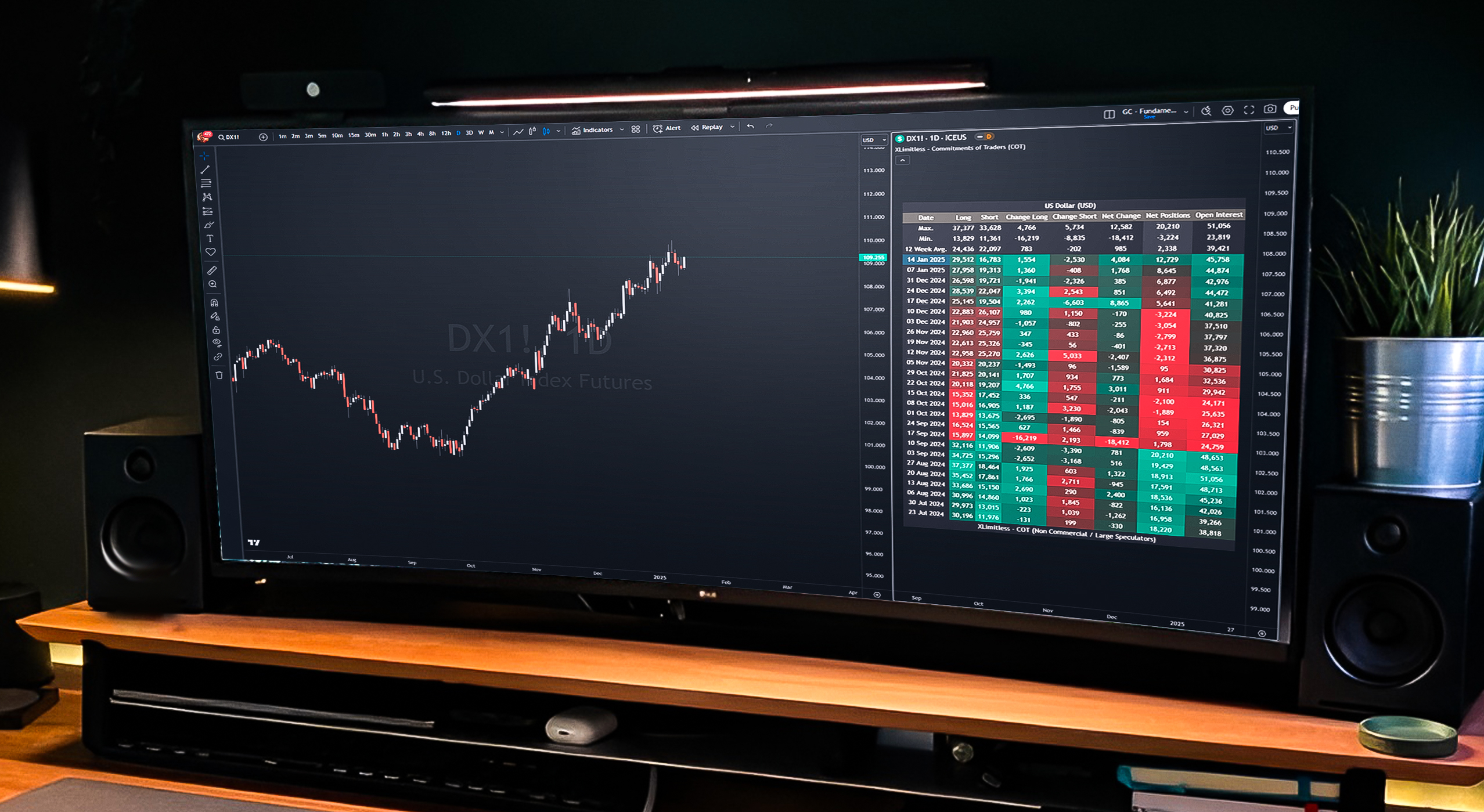
The "X Limitless - Commitments of Traders (COT)" indicator is a comprehensive tool designed to analyze market sentiment based on Commitment of Traders data. By visualizing the positions of key market participants, this indicator enables traders to identify trends, reversals, and key levels of market activity.

Get access to the X Limitless - Commitment of Traders (COT) Indicator

Key Features

1. Detailed Participant Data

  • Tracks Commercials, Non-Commercials, and Non-Reportables positions.
  • Displays Long, Short, and Net positions alongside Open Interest.

2. Customizable Visualizations

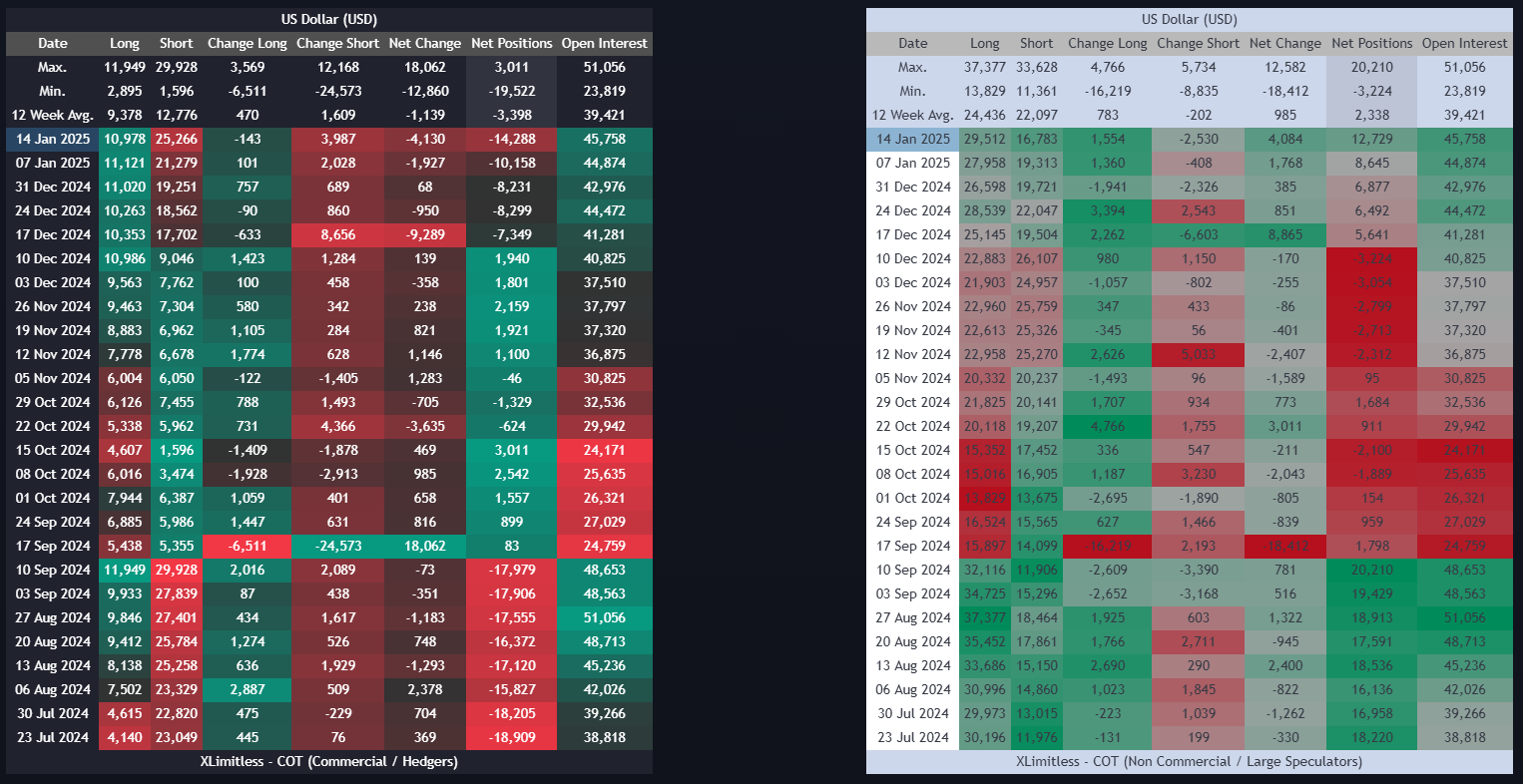
  • Dark and Light themes for table display.
  • Heatmap-style visual cues for changes in positions and Open Interest.

3. Dynamic Table Display

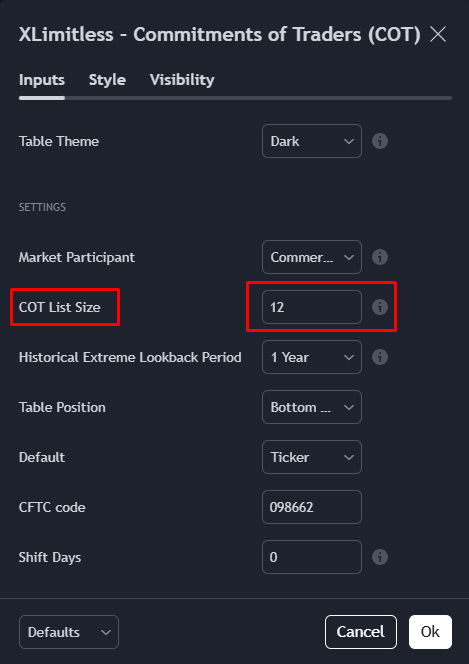
  • Provides data for the latest COT reports with customizable list size (e.g., last 12 weeks).
  • Includes averages, maximums, and minimums for comprehensive insights.

Setup Instructions

Adding the Indicator

1. Open TradingView.

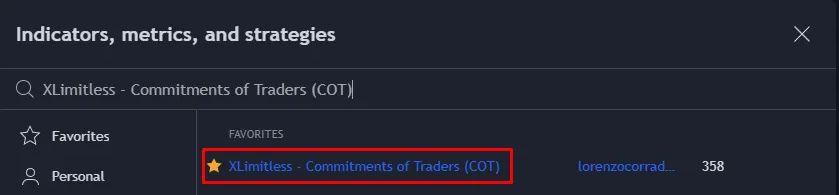
2. Navigate to the "Indicators" tab.

3. Search for "X Limitless - Commitments of Traders (COT)" and add it to your chart.

4. Recommended to use on the Daily Timeframe for faster updates due to the bar calculations.

Customizing Inputs

Table Theme:
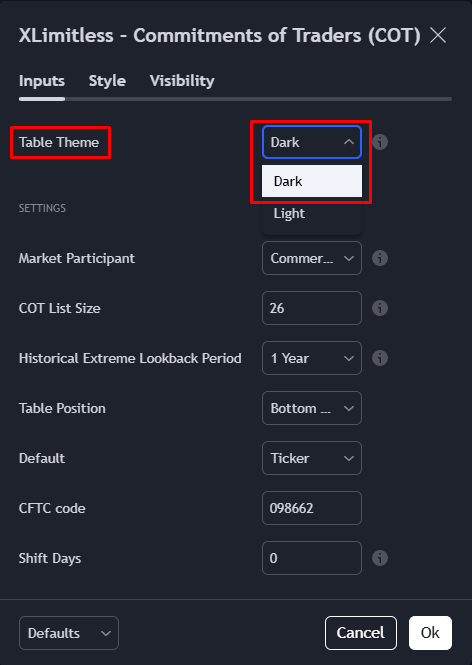
  • Choose between Dark and Light modes for better visibility.

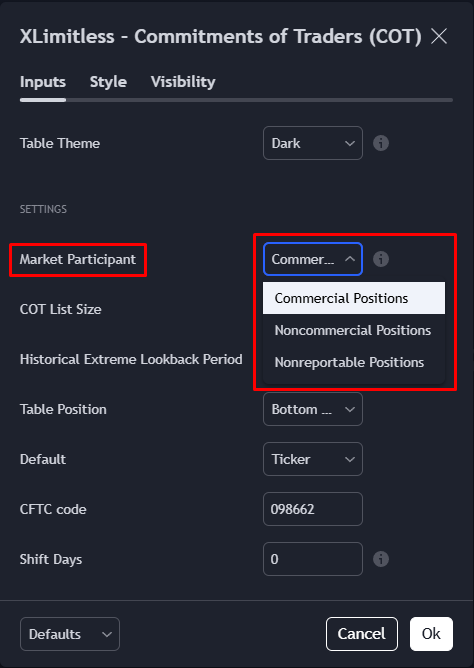
Market Participant:

  • Select the group to analyze (e.g., Commercials, Non-Commercials).

COT List Size:

  • Define the number of weeks to display (default: 12 weeks), Max 52 Weeks.

Historical Extreme Lookback Period:

  • Adjust the lookback period for heatmap calculations (e.g., 1 year, 5 years).

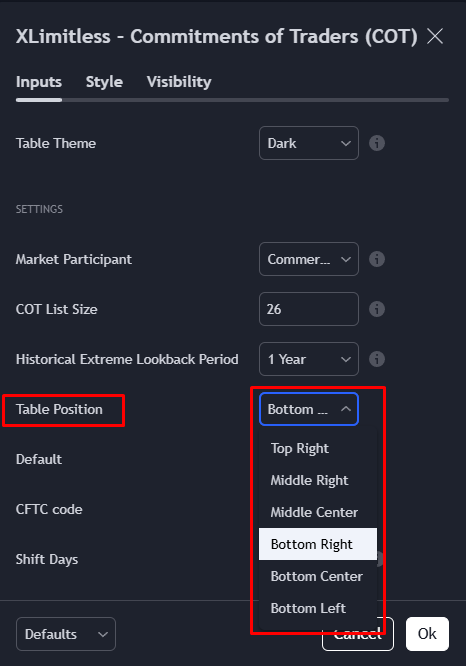
Table Position:

  • Choose where the table should appear on the chart (e.g., Bottom Right).

How It Works?

Data Source

  • The indicator uses COT Legacy reports, accessible through TradingView’s COT Library.

Visualization Logic

1. Table Rows and Columns:

  • Rows include Date, Long, Short, Change Long, Change Short, Net Change, Net Positions, and Open Interest.
  • Columns display data for each of these metrics, updated weekly.

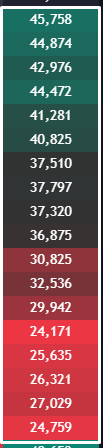
2. Heatmaps

  • Highlights extreme values within the historical lookback period using a color gradient (red for lows, green for highs).

3. Averages and Extremes:

  • Calculates the 12-week average, maximum, and minimum for each metric.

Best Practices

1. Focus on Extremes

  • Use heatmap colors to identify extreme positions on all market participants, which may signal potential reversals.

2. Combine with Technical Analysis

  • Pair COT data with Seasonality and Valuation Analysis, Moving Averages, or Support-Resistance / Supply & Demand.

3. Adjust Lookback Period

  • Experiment with different lookback periods to better capture market cycles.

4. Monitor Specific Participants

  • Analyze Commercials for hedging activity, Non-Commercials for speculative trends, and Non-Reportables for retail sentiment.

Example Use Case

Scenario:

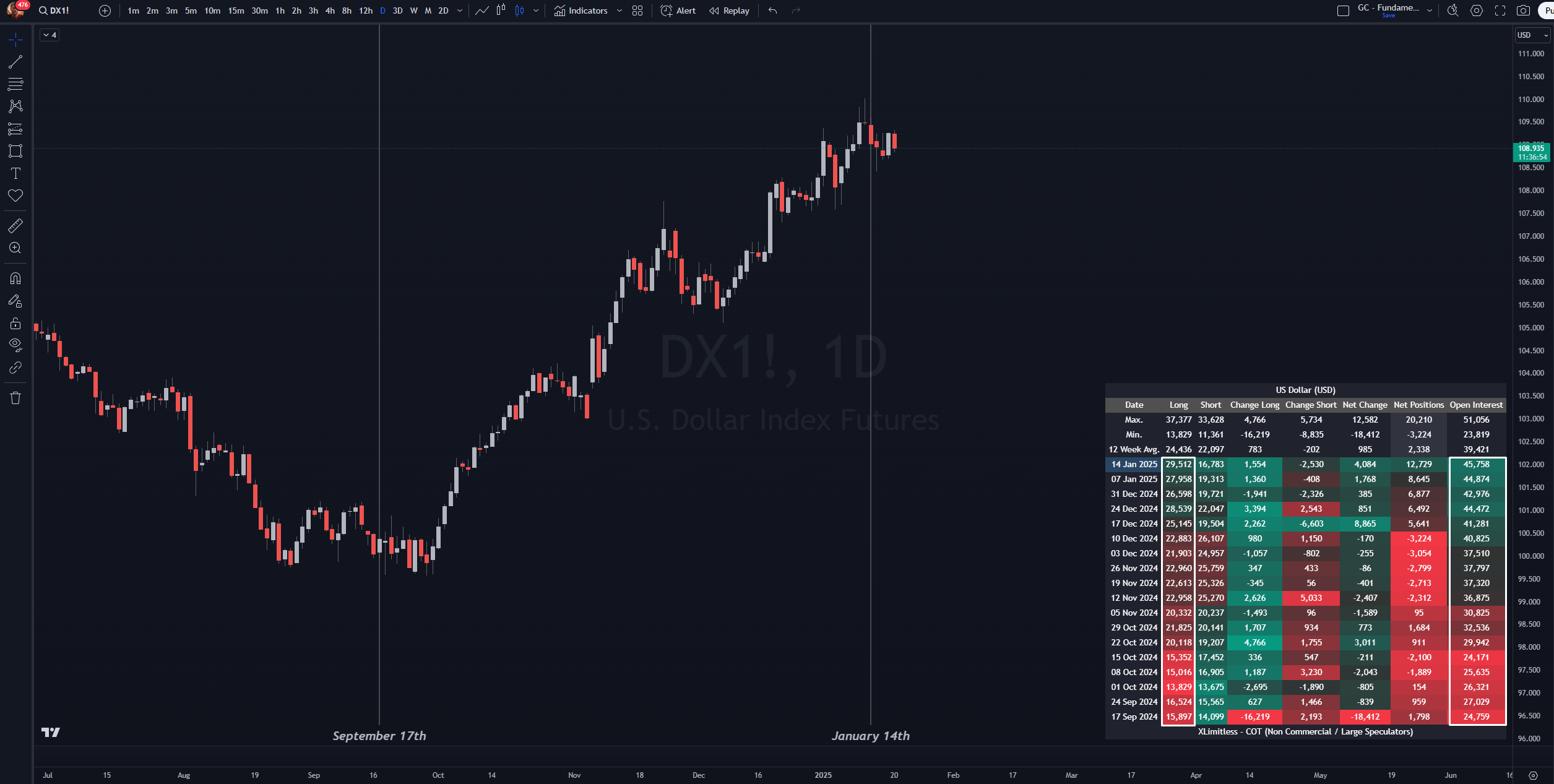
  • You are analyzing Dollar futures and want to assess market sentiment among Large Speculators.

Steps:

  1. Add the "X Limitless - Commitments of Traders (COT)" indicator to your Gold chart.
  2. Set "Market Participant" to Non-Commercials and "Historical Extreme Lookback Period" to 2 years.
  3. Observe the table:
    • Large Speculators’ Long Positions are building multiple weeks in a row.
    • Open Interest is steadily increasing along with the bullish trend.
  4. Conclusion: The bullish sentiment among speculators suggests potential continuation of the uptrend.

FAQs

1. What is the "12 Week Average"?

  • The 12-Week Average in the XLimitless - Alpha Screener represents the average percentage change for each day of the selected month over the past 12 weeks of historical data. It provides a smoothed and more stable view of recent trends, making it easier to identify consistent patterns or shifts in market behavior.

Why It’s Useful?

  • Short-Term Trends: The 12-week average highlights shorter-term seasonal tendencies without the noise of daily fluctuations.
  • Contextual Insights: It helps compare current daily trends against recent historical averages, offering a benchmark for whether recent performance is stronger or weaker than usual.
  • Decision Support: Traders can use it to confirm if a particular day or period aligns with recurring short-term trends before making decisions.

2. Can I analyze multiple assets simultaneously?

  • No, the indicator is designed for one asset at a time. Add multiple instances for additional assets.

3. How often is the data updated?

  • Data updates weekly, typically on Fridays/Monday when the COT reports are released. This can vary based upon the connection with TradingView.

4. What does the heatmap represent?

  • The heatmap highlights extremes within the lookback period, with green indicating highs and red indicating lows.

Disclaimer

The X Limitless - Commitments of Traders (COT) indicator is designed to provide insights into market sentiment based on historical positioning data. However, it does not guarantee future market performance or outcomes. The indicator relies on COT data, which reflects past market conditions and may not account for sudden market shifts or unforeseen events. Always use this tool as part of a comprehensive trading strategy and perform your own due diligence. Trading involves significant risks, and users are solely responsible for their investment decisions.